If you have been reading the news there is a new search engine by the name of Cuil - www.cuil.com. It is different and brings results in a little bit different fashion. As per TechCrunch be sure and type the name correctly. I have tried Cuil and have found it quite interesting in it's return of information (or not). It was a little difficult to get to this morning due to everybody trying to see what it does but that has eased up. We all look for results in a different fashion and when I started in the mid 90's we had Webcrawler and that was the only thing I needed. It was the end all search engine that came into being in 1994. Today we have Google, Yahoo, and to many others to list here however they are all worth a look see to find if it is the one that returns the results in an order that you would like. The GIANT card catalog in the sky. Check this one out - www.cuil.com. You can also check out the article reviewed at TechCrunch here http://www.techcrunch.com/2008/07/27/cuill-launches-a-massive-search-engine/. And there is more information here at Computerworld (to which I was pointed to by The Eponymous Pickle).
Monday, July 28, 2008

Friday, July 25, 2008
More Crackberry Goodness
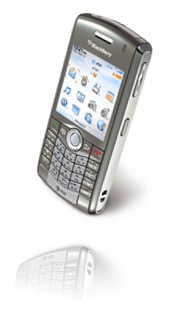
I have been vexed for quite some time, as has a friend of mine, regarding the process one must use to delete multiple messages in the Blackberry environment. It seemed as if there was no way to delete multiple e-mails / text messages, or delete all of them simultaneously. On my previous cell phone, the Sony Ericsson W810 (a great little phone by the way), you could easily delete all text messages in one fell swoop. Because I am able to keep track of several different e-mail accounts, in addition to all of my text messages, my message views on my Pearl were beginning to become more than just a little cumbersome. Up to now, I have been deleting items one by one, which, as one can guess, is dramatically inefficient. Thankfully, I have found the answer I have been looking for: how to delete all or multiple e-mails or text messages simultaneously for a given date. My thumb is now forever grateful for finding this little gem.
In order to delete multiple e-mails or text messages, all one has to do is hold the alt key down on the keypad and roll down the list, which selects the e-mails / messages one by one as you drag down. Once you have all the e-mails / messages you want to delete selected, all you have to do is press the Menu button and choose the Delete option. If, on the other hand, you want to delete all of the e-mails / messages for a given date, just roll to the date above the messages, and while selected, press the Menu button and choose the Delete Prior option, which will delete all messages for that date! Whew! What a find! This now means that I can spend more productive quality time with my Crackberry, and by productive, I mean text messaging my friends.
Hopefully this little tidbit helps you become more productive with your own Blackberry device! Viva la Blackberry!
BYL = blog you later!
Thursday, July 24, 2008
Microsoft Outlook & Hotmail LIVE!!
It looks like Microsoft is going to bring the “synchronization” capabilities between YOUR Outlook (Personal) and Microsoft’s LIVE (which would be your personal online connection).You will be able to update your calendar, contacts and email between your Outlook and LIVE. From Microsoft’s announcement this looks interesting. Here is the link that you can check out: Microsoft Office Outlook Connector 12.1 Beta.
This will work for Outlook 2003 as well as Outlook 2007. You do have to have a Microsoft LIVE account and this link will lead you to it. You will need to have a Microsoft Passport ID and all that is required is to have a Hotmail email address.
I have been using Google’s Synch tool between Outlook and Google to keep connected however if you are a Microsoft LIVE user this would appear to be a better answer. What we need is a way to stay connected while on the road. If you have not already looked you might want to look into Microsoft LIVE! There is a way to use online storage as well as sharing files with others via LIVE.
Tuesday, July 22, 2008
MS Office Blog To Help With Office Problems
I am working on a review of the various Note taking software packages available however I thought it would be a good idea to pass along a blog of interest to those who use Microsoft Office. I have followed this blog for a number of years and have found some of the information to be quite useful. The link for you to check out is to MS Office Blogs @ TechRepublic. You may have to register however there is no charge and if you are using an RSS reader to review your blogs this is one you should capture.
RSS readers are now available in Internet Explorer (IE7) or the latest release of Firefox. You can also use Google’s RSS Reader (which is my current choice). I happen to like Google’s reader because it is there for me to “see” whenever and wherever I want. I can email articles from it without issue since I also have a Google email address (free of course)
Saturday, July 19, 2008
Saturday’s Searching For More
 This is a new service that tracks who is talking about you on Twitter. That is YOU, your company and or your products. This is not something you have to watch every minute for once you sign up and you set up the parameters TweetBeep will email you when your name (company name, product, etc.) is mentioned and the service is FREE. Check it out at TweetBeep, Since Twitter has received some new funding it would appear that it is getting a bit more stable. Interestingly I have 14 people following me and I do not Tweet that much.
While checking things out this weekend you might want to look into Viewzi, a new search engine. I have been fascinated with the new search web sites that appear from time to time as they are not “new” per se but give us another way to “view” our search results. Mahalo has been around for awhile and is doing well with not only search but presents it’s own Internet TV (Video Podcast’s) as well as it’s own news type of pages. Viewzi is yet another way of presenting “View’s” of your data. Per Viewzi “It’s all about the view”. Although Viewzi is till in Beta is worth the experience. Be warned that once there you might find your self hanging out while searching for different “views.
Tuesday, July 15, 2008
Online Meeting Resource
One of my colleagues mentioned that he was reviewing online web meeting software and I have just discovered what would appear to be someone new in this area. The company is Dimdim and it looks rather interesting. No desktop client is involved (you do not need to download anything) and it is free for you to use as an individual. You can “collaborate, chat, talk and broadcast via webcam”. There are other versions such as Dimdim Pro and Dimdim Enterprise which have fees involved but from the looks of the cost involved this would appear to be a real competitive program. The FREE version allows up to 20 people in a room where the Pro version allows up to 100. They will host the meeting software on their servers (back to the cloud).
From their own web site:
Dimdim is available as open source software so you can extend and improve it freely. Dimdim already integrates with CRM and LMS software and can be extended easily. And Dimdim is extremely flexible, available in hosted and onsite configurations and easily customizable.
According to a Tech Crunch article Dimdim has 500,000 subscribers and on July 9th Dimdim received an additional 6 million in funding. Maybe we need to check this out
Friday, July 4, 2008
Floating on an Apple Core in the Clouds
 Much to the chagrin of some of my more Microsoft Oriented co-workers, I seem to have the beginnings of an addiction to Apple products (some may argue it is not the beginning of an addiction, more like a worsening addiction). Well, here I go again about Apple and their newest entree into Cloud computing…their MobileMe environment. MobileMe has become the replacement for the .Mac accounts that Apple enthusiasts are familiar with and was unveiled at the last WWDC in early June of this year and is slated for release at some point in July.
The basic account features of MobileMe are as follows:
[Accounts for individuals]: 1 year subscription is $99 with 20GB of combined e-mail and file storage ($49 for an additional 20GB of storage capacity & $99 for an additional 40GB of storage capacity), 200GB of monthly transfer, and access to the full gamut of MobileMe.
[Family Pack accounts]: 1 year subscription is $149 with one individual account plus 4 family member accounts, each family member gets their own e-mail address ($49 for an additional 20GB of storage capacity & $99 for an additional 40GB of storage capacity), 5GB of combined e-mail and files storage, 50GB of monthly transfer, and access to the full gamut of MobileMe.
The basic features of a MobileMe account are as follows:
[Push e-mail]: works with the Mail program on a Mac, iPhone, and iPod Touch, and also works with Outlook, Outlook Express, and Windows Mail.
[Push Contacts]: works with Address Book on a Mac, Contacts on the iPhone and iPod Touch, and also works with Outlook, Outlook Express, and Windows Contacts. When you use me.com, you can find contacts by using the integrated Google Maps feature.
[Push Calendar]: works with iCal on the Mac and Outlook on the PC
[Gallery]: a central location for the storage of pictures that can be accessed from any computer via a web browser. This is similar to the offerings of Flickr and other similar image hosting web-sites.
[iDisk]: this is an online hard drive for the storage of files. On a Mac, you can use the Finder feature to search your iDisk for content. Additionally, there is drag and drop capabilities, as well as file sharing and downloading of files.
I think the interesting aspect of this is that Apple takes great pains to make sure that individuals using PCs will be able to use this environment. It now seems the Microsoft Mesh will eventually be able to support individuals on a Mac; initially, I didn’t see any support for Mac, only PCs. It could be that Microsoft saw what MobileMe was going to let people do, which then forced their hand. I could be wrong, it could be they intended to do this all along; it just seems that the timing is a little coincidental. Mesh does give you 5GB of storage for free, which is smaller than MobileMe’s 20GB, so I wonder if eventually one will be able to pay for more server space like you can with MobileMe; in today’s workplace, 5GB is not a lot of room. It also doesn’t appear that you can sync email, contacts, and calendars in Mesh, it’s more geared toward file sharing and folder synchronization. Either way, I think it’s a great idea that the two biggest platforms start cooperating more with each other, as both frankly have their strong and weak points.
I refer back to a more philosophical blog that I created last month called Our Head in the Clouds: while our heads may be in the clouds, or at least floating in that general direction, it will be important that we still learn to save everything on ‘older’ media such as CD-Rs, DVD-Rs, and flash drives. All of this technology relies on the stability of the Internet, and as we all know, it can be as unstable at various points in time. Additionally, one may find oneself in a location where there is no Internet access, and if you don’t have an alternate means of accessing a file, you will be out of luck.
In the end, I cannot wait to get my iMac next year and begin to use MobileMe to see how well it integrates both a Mac and PC universe; I’m sure it will be quite an interesting trip to say the least! Until then, I think I will try playing around with Mesh for a while.
And by the way, Happy Independence Day; may we all remember what this day is celebrating and try to live that out in our daily lives. As always, don’t forget to thank a veteran for what they have done, or are doing, to help keep this nation free!
The Friday July 4th Review
It’s Friday and it is time for a “Weekly Review”. I have been digging around this morning with regards to Microsoft as I have read (and heard) that they are going to start a subscription program for software in the near future and I wanted to know more so out to Microsoft I went. So far I have not been successful at documenting the software rental story but I did find a number of other good things; Microsoft Startup Center for Small Business, Microsoft Hosted Services – which I found very fascinating with regards to what they will do for small businesses, and then Microsoft Unified Communications which links you to the power of software (Microsoft’s) to have a complete communications program. Interestingly this is aimed at small as well as larger business.
In my travels at Medgadget this morning I discovered a computer being used/promoted within the medical field that drew my attention. This looks like it could be used by anyone traveling that has to deal with clients/customers and be able to research their account information. It really did look quite handy. Link here; Motion C5 Mobile Clinical Assistant Gets New Features.
From Reuters’ News Service a note about an acquisition that could be quite interesting; Ask.com closes acquisition of Dictionary.com. That is if you use dictionary and thesaurus tools that are web based. If you are using Microsoft Office applications these tools are built in however if you are using some of the Cloud services you may have the dictionary but need the thesaurus. Sometimes I think a thesaurus is as important as a dictionary in writing to get my point across.
I found the Microsoft rental software story on a podcast by John C Dvorak on “tech5” (“the most important 5 minutes of your day”) and then followed that with a Google search to Slashdot which led to a Yahoo article; “Microsoft to sell Office, One Care for $70 a year”. Whew, just doing due diligence, however I have not been able to locate it at Microsoft or at Circuit City which the article references.
One last note here (as I finish my Starbucks coffee) is that there is now a site, http://www.flightmemory.com/ that has the following description from it’s web site: Flight Memory enables you to easily keep track of where you have flown and then easily produce maps showing your flight routes. This was found via a link from WebWare which is a blog with other great links. This is something I have always thought about as I fly. I see things on the ground and would like to know where they were precisely. I will look further into this.
*Please note Starbucks does not pay for any promotional reference to it’s name. In fact neither does anyone else mentioned herein, darn.
AVG is evil and it must be stopped!
The biggest complaint that I have seen about this new feature is that it has increased web traffic. Those webmasters who are trying to analyze web traffic are having fits trying to sort out real website requests from those initiated by AVG. They are even going so far as to redirect the requests back to AVG in order to "teach them a lesson." This has resulted in the AVG site being unavailable for signature file updates. This seemed like a great idea some webmasters. Let's block people from getting the virus signature files so their computers become infected. What a service you are providing to humanity!
Having just spent several hours on the phone and using remote desktop to clean my father-in-law's computer in Pensacola, Florida, of nasty malware/spyware, I can tell you I welcome this new rating system. I have tried to explain to him that there is a right way to download software from the Internet and there is a wrong way but he is not the computer expert he needs to be to protect himself. So if there is an additional way to indicate to him that there is malicious intent associated with a website, I welcome it. Webmasters should reconsider their attempts to circumvent the efforts of AVG. Those of us in the computer security field recognize that additional security inhibits productivity initially, but in the long run the time and energy it takes to counteract the effects of malware will be lessened if not eliminated.
Tuesday, July 1, 2008
Update On Software & Technologies for Today
From the Official Google Blog for today “…we have already seen more than 500,000 organizations adopt Apps as part of their business..” It looks like Google App’s are doing well at least in Europe. The article is worth looking at and they give a good example of it’s use. It’s Cloud Computing on the leading edge.
On another point, in my email this morning was the update on EverNote and it has gone to a Public Beta which means you can sign up without an invite. This all has been noted in an entry in Paul Thurrott’s Super Site Blog with a complete listing of the more recent additions to the tool. I have been using EverNote for about 2 months now and I find it very good. I do have to admit that now with Microsoft’s Mesh I can use OneNote again and have it synchronize via Mesh. This is also a GREAT tool.
A step away from the software end to a blog that I have found quite interesting for it’s use of introducing new items in the medical industry is Medgadget. Today the FDA approved a Onetouch Ping Diabetes System that communicates wirelessly to an insulin pump. It is fascinating to see technology being used to make life better. There are many gadgets that come up here that are worth noting.
Speaking of gadgets you need to look at Engadget. This is one for the RSS reader (which ever one you use). It comes up with absolutely the latest and greatest of gadgets (some not my style). From Engadget today I was able to find a buy in a workstation that looks rather interesting. Check out this HP xw4550 Work Station starting at $599. Not bad with 2 GB of SDRAM, 160 GB Hard drive – and so on. Follow the link and you can check that out. You buy the box that will run the software just like you buy the TV that will give you the picture you want or the washing machine to wash your clothes. We are all looking for results.
The sad news today is that Starbucks will be closing 600 stores, I sure hope that none of them are where I go.